Your Mac finally
remembers.
Everything you copy — and everything you see on screen — captured, indexed and searchable in one keystroke. 100% on your Mac.
Free for 7 days · no card, no subscription
Free · macOS 14 Sonoma+ · Apple silicon & Intel · No account. No tracking. Works offline.
Copy. Paste. Lose. Repeat.
Your Mac remembers one copy at a time. The next one wipes the last — and you only notice when it's gone.
"Where did that go?"
You copied it minutes ago. Three copies later, it's nowhere.
Hunting it down again
The code, the address, the link — back through tabs and apps to copy it twice.
Copy just to fix it
Paste into another app to clean, translate or summarize. Every time.
“Your clipboard was built in 1983. Time for one that thinks.”
Your Mac, with a memory.
ClipMind sits in your menu bar and remembers everything you copy — then makes it findable and useful.
Without ClipMind
- One copy, then it's gone
- Dig through apps to find it
- Switch apps just to fix or translate
- Passwords sit in plain sight
With ClipMind
- Every copy saved & searchable
- Find it in one keystroke
- Fix, translate, reply right there
- Passwords & cards auto-masked
A clipboard that thinks
Not a list of pasteboards — a memory of your work, smart enough to act on it.
Saves everything, automatically
Text, links, code, images, screenshots, PDFs and files — even copies from your iPhone. Kept the moment you copy.
⌘⇧V, anywhere
One shortcut opens your full history at the cursor, in any app. Arrow keys, Enter, done.
Search by meaning
Find "the screenshot from August" even if you forget the words. Typo-tolerant and instant.
31 AI actions
Copied code? Review it. An email? Draft a reply. A long read? Summarize it. One click, ready to paste.
Your AI, your choice
Apple Intelligence, a local model, or your own Claude, GPT or Gemini key. Or none — it's a great clipboard either way.
Ask your Mac
"What was that address?" Ask in plain words and get an answer from what you've copied — with sources.
This is your clipboard now
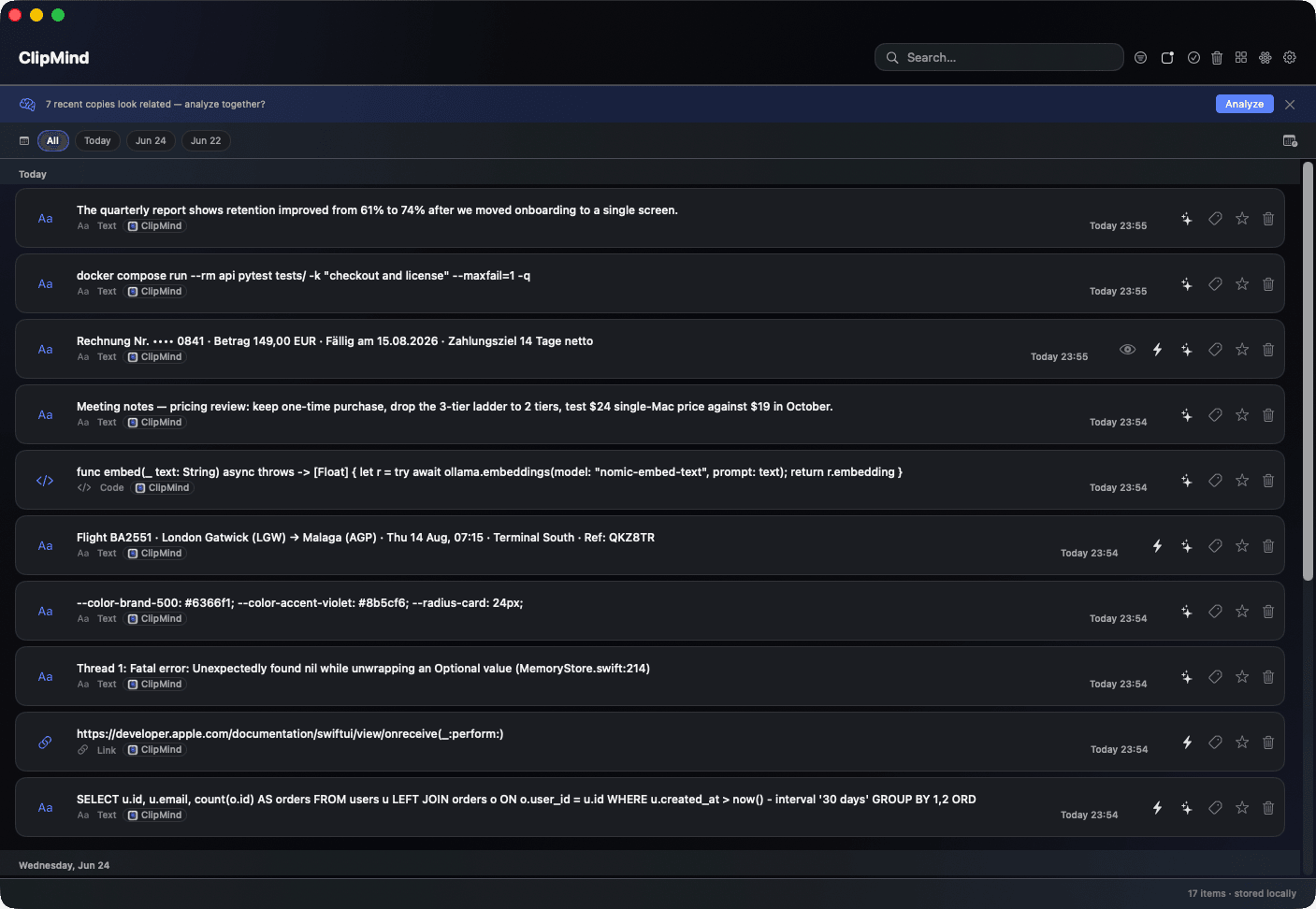
Everything you copied, in one place — searchable and ready to act on.
Search your whole history by meaning — type a word, find the copy.
Pick any item and let on-device AI summarize, fix or reply.
Memoize expensive renders with useMemo/useCallback, split context to avoid re-renders, and profile with the React DevTools flamegraph.
It knows what you copied
ClipMind shows only the actions that fit the content — no menu hunting.
A diff? It writes the PR description and commit message too.
Plus one-tap actions: call a number, open an address in Maps, add a date to Calendar — straight from a copy.
It all stays on your Mac.
Passwords, messages, client data — it all passes through copy and paste. ClipMind treats it that way.
Stays on your Mac
Your history lives in a local database. No account, no cloud. We can't see it — there's nothing to see.
True offline mode
One switch and AI runs only on your Mac. Nothing ever leaves the device.
Secrets auto-masked
Passwords from password managers are never saved. Cards and API keys are masked on sight.
No tracking
No analytics, no profile, no ads. Software you run — not a service that watches you.
If it runs on your Mac and never phones home, privacy isn't a promise. It's the design.
Three steps, then forget it's there.
Install
Download, drag to Applications, open. A quick setup grants the permissions it needs.
Keep copying
Work as usual. ClipMind quietly remembers everything in the background.
Press ⌘⇧V
Recall anything, search by meaning, run an AI action. Then get back to work.
A memory of your work
Once your Mac remembers what you copy, more becomes possible.
Daily recall
A quick recap of what you worked on, grouped by topic, summarized on-device.
See the connections
A live graph links related copies by meaning, time and app.
Voice search
On-device speech in ~99 languages. Audio never leaves your Mac.
Index your folders
Point it at a folder — documents, PDFs and images become searchable, OCR included.
Why people trust ClipMind
No fake quotes. Just what matters when an app sees everything you copy.
- Local-first storage — your data never depends on our servers.
- Bring your own AI or use none — never locked in.
- A real native Mac app: menu bar, hotkeys, Apple silicon.
- Signed, automatic updates — secure and effortless.
- Honest free tier, clear Pro — no dark patterns.
Made for developers, writers, designers and anyone who lives in copy and paste.
Free for 7 days. Then yours forever.
Every feature unlocked. No card, no account.
- Unlimited history
- All 31 AI actions
- Ask your Mac, recall & graph
- Auto-clean iPhone copies
- Bring your own AI keys
Keep everything, forever. No subscription.
Free for 7 days · no card, no subscription
One-time purchase. No subscription, no account.
Straight answers
No. Everything is stored locally, with no account and no cloud by default. If you use a cloud AI with your own key, only the text you run an action on is sent — and Offline mode blocks even that.
Stop losing what you copy.
Give your Mac a memory. ⌘⇧V — and it's all right there.
Free for 7 days · no card, no subscription
Free · Private · Built for macOS 14 Sonoma